post tool . transfer dailies . client video review . master deliver.

chimping.io

Send cuts to clients for frame-accurate comments. Deliver master files with download links. One subscription, one login — no per-GB transfer fees, no separate review tool, no awkward Dropbox permission requests.

chimping.io — transfer dailies, client video review, master delivery, for the freelance creative.
Sign up to start the 3-day trial.Limited usage during the trial — 1 project, 1 hour of footage, 5 GB storage, 20 min of new review uploads. Send-Ship file transfers unlock on the full plan. Full plan unlocks when it converts. Card required; cancel anytime in the first 3 days to avoid the charge.
Sign up →

Have you had this moment?

“Hey, can you get me access to that Dropbox folder?”

The moment a client asks this, you’ve already lost the workflow. They wanted to download a file. They got a permission request.

Built for the working freelancer

One tool instead of four

Most of us are juggling a review tool, a per-GB transfer service, a folder share, and a cloud backup. Four logins, four bills, four awkward moments when a client asks where they’re supposed to download something.

Mountain Creative bundles the whole stack: client review with frame-accurate comments, master delivery with branded share pages, one-off file transfers for color and sound handoffs (no per-GB bills), and inbound receive links for finished returns. Same login, predictable monthly cost. Recipients download with the free Mac app — no account, no per-seat tax, folder structure preserved.

Get clients on the same page

Inside · review

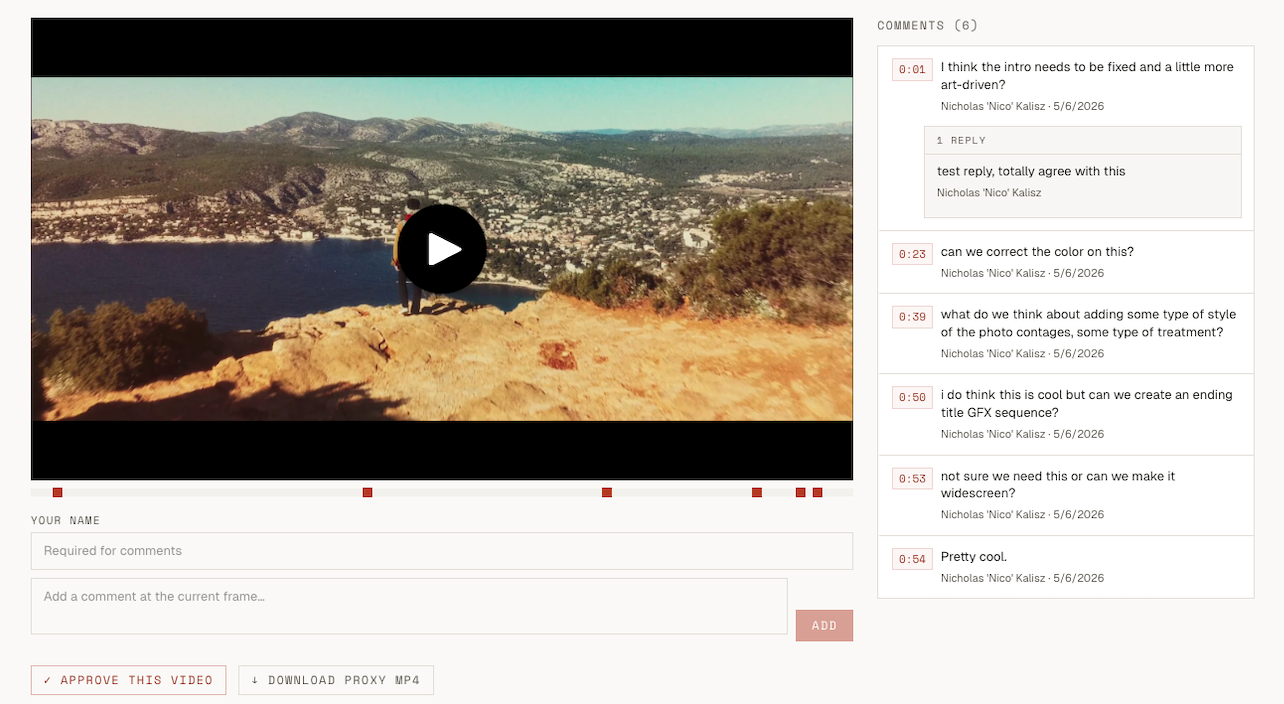
Get clients on the same page

Frame-accurate comments and per-asset approval, no client account needed.
Hand off finals and dailies, cleanly

Inside · deliveries

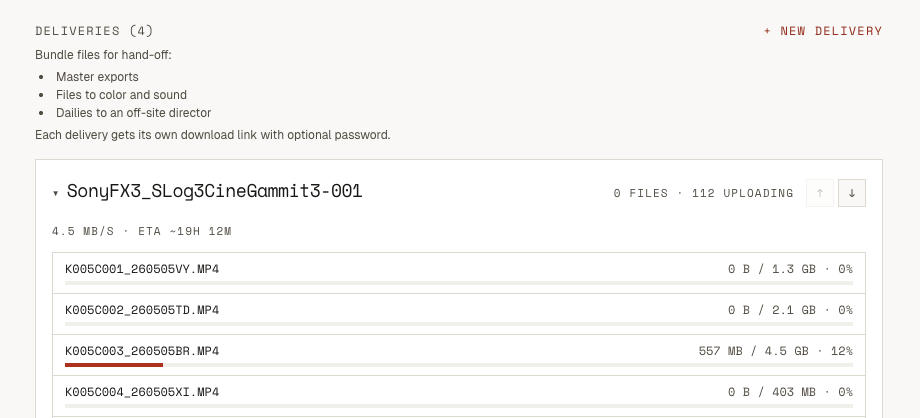
Hand off finals and dailies, cleanly

Network drops recovered automatically. Live speed and ETA. Password-protected download links.
Big files, on autopilot

Inside · desktop app

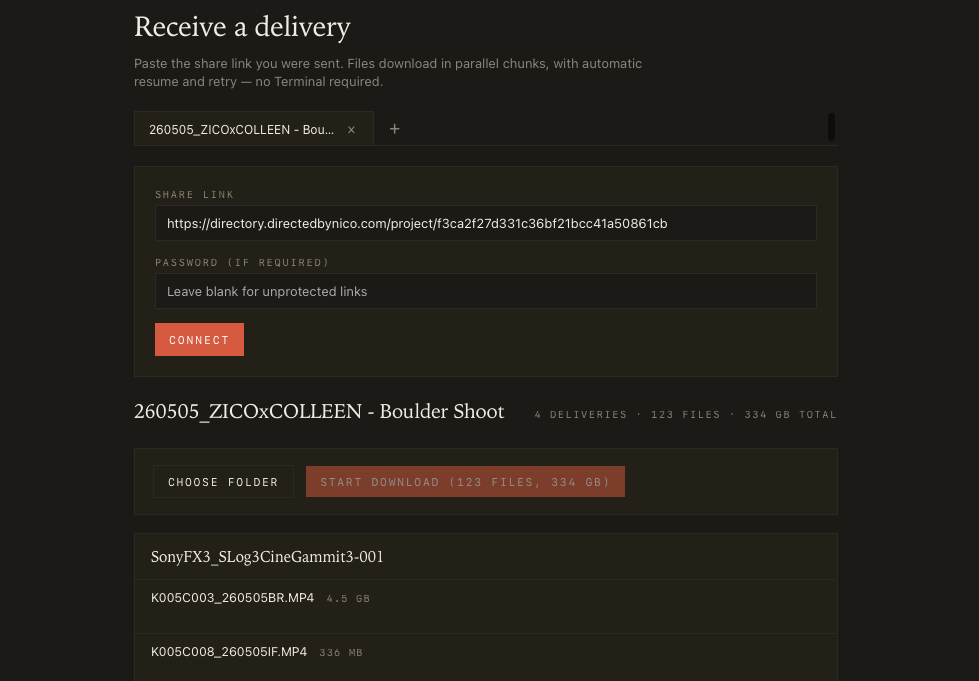
Big files, on autopilot

Mountain Creative Delivery — native Mac app for recipients. Paste the share link, pick a folder, walk away. Parallel-chunk downloads, automatic resume on dropped Wi-Fi, no aria2 install. Free for anyone you send files to.
↓ Get the Mac app

Get files back with folder structure intact

Inside · receive

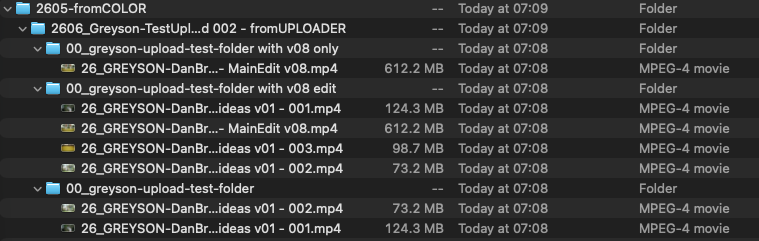
Get files back with folder structure intact

Share a receive link with your colorist, editor, or sound designer. They drop in a folder — /graded/Reel-01, /audio/STEMS, whatever — and you pull it down via the Mac app with the exact hierarchy they sent. No zip step, no re-organizing on the way in.
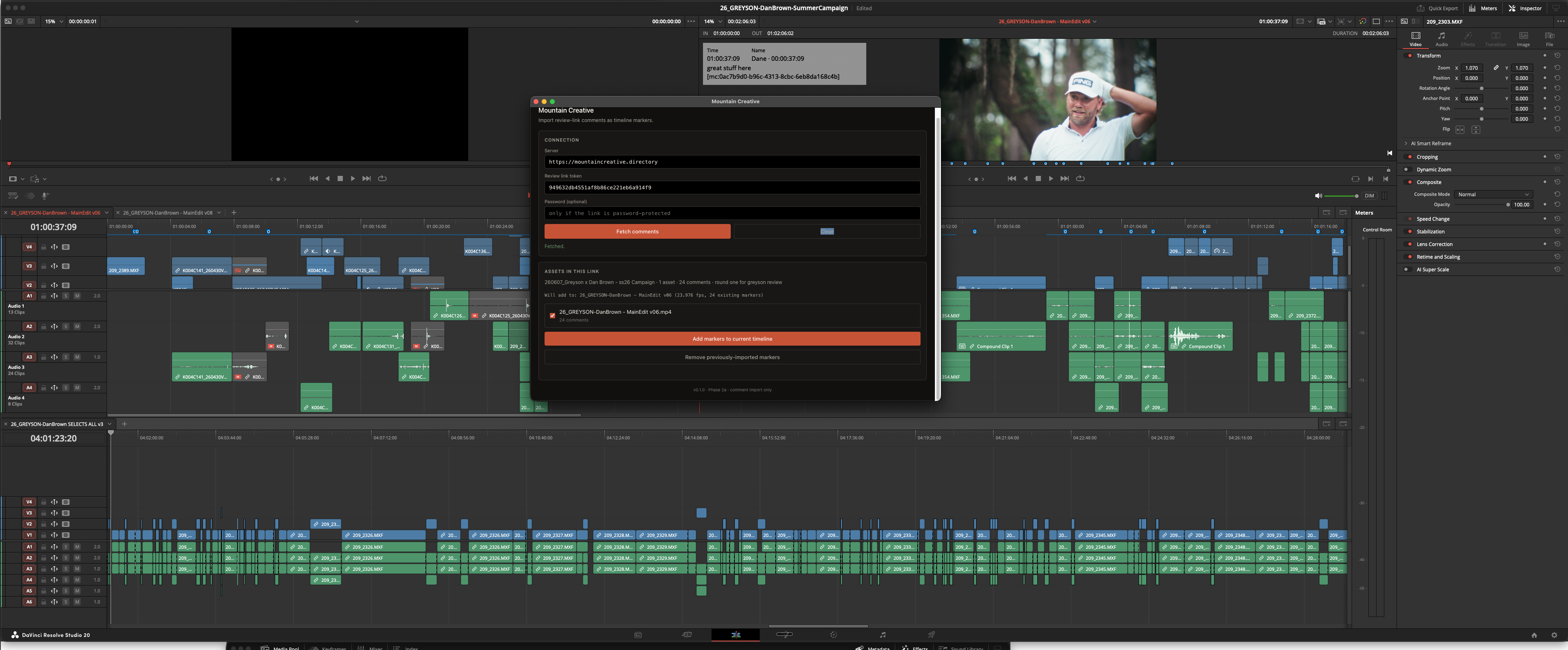
Stay inside DaVinci Resolve

Inside · Resolve plugin

Stay inside DaVinci Resolve

Render-and-upload a cut straight to a review link without leaving the timeline. Same for master deliveries — no watch folder, no Finder roundtrip. And when your client leaves notes on the review page, pull them back into your sequence as native timeline markers. No copy-paste from a Google Doc, no re-typing timecodes. Free for any paid plan.

→ See the Resolve plugin

Pricing

Flat monthly. No per-GB transfer fees.

One bill. Recipient downloads are unlimited on every paid plan and never count against your storage. 3-day trial available, with limited usage during the trial — full caps unlock when it converts to the tier you picked.

Flex your tier to your workload

Heavy upload month? Upgrade to Studio for the cycle, do the work, drop back to Solo at your next billing date when things quiet down. Big dailies push that exceeds your transfer cap? Upgrade for the month, send the files, downgrade — you’ll be back at Solo when the next cycle starts. Upgrades are prorated (pay only for the days at the higher tier); downgrades take effect at your next billing date, so you keep the higher caps through the rest of the cycle you’ve already paid into.

Solo

$9/mo

Solo freelancers with 1–2 projects in flight

  • 500 GB master delivery storage
  • 30 min of new review uploads / month
  • 300 GB of file transfers / month · dailies + finishing
  • Client review and delivery links with password-protection if needed
  • Render-and-upload from inside Resolve
Start trial →
Most picked

Studio

$19/mo

Working filmmakers running 3–5 projects in parallel

  • 1 TB master delivery storage
  • 90 min of new review uploads / month
  • 750 GB of file transfers / month · dailies + finishing
  • Client review and delivery links with password-protection if needed
  • Render-and-upload from inside Resolve
Start trial →

Pro

$35/mo

Documentary, episodic, and multi-cam workflows

  • 2 TB master delivery storage
  • 180 min of new review uploads / month
  • 1.2 TB of file transfers / month · dailies + finishing
  • Client review and delivery links with password-protection if needed
  • Render-and-upload from inside Resolve
Start trial →

Already a member? Sign in.

Questions people actually ask

Frequently asked

Do my clients need an account to review or download?
No. Clients open a share link in their browser — they comment on cuts, approve, and download masters without signing up for anything. The account is yours, not theirs.
How is this different from Frame.io?
Frame.io is great and has a lot of bells and whistles a lot of filmmakers I know don't ever touch. To get the rest of a filmmaker's workflow — master delivery to clients, mid-project transfers to color and sound, folder-preserved receive links from your colorist — you'd pair Frame.io with MASV, WeTransfer, or Dropbox and pay all of them. Mountain Creative Directory bundles review, master delivery, transient file transfers, and folder-preserved inbound on one subscription. Recipient downloads are unlimited, and folder structure is preserved end-to-end: out to color, back from color, no .zip step, no missing files.
How is this different from MASV or WeTransfer?
MASV bills per gigabyte delivered (around $0.25/GB), so a 1 TB hand-off can cost $250 or more. Here, recipient downloads are unlimited on every paid plan and don't add to your bill. You also get a real review tool with timecoded comments and approvals in the same subscription.
What happens to my files if I cancel?
Your projects, comments, and approvals stay in your account in read-only mode for 30 days after cancellation so you can re-subscribe without losing anything. After 30 days the files are permanently deleted. Active share links stop working as soon as the subscription ends.
How large can my master files be?
No per-file size cap — a full short film master at 4K ProRes 4444 XQ (~250-300 GB) uploads fine. The constraint is your plan's total master delivery storage: 500 GB on Solo, 1 TB on Studio, 2 TB on Pro. Network drops during upload are recovered automatically on the desktop app and in the browser.
Is there a free trial?
Yes — a 3-day trial. Limited usage during the trial (1 project, 1 hour of footage, 5 GB storage, 20 min of new review uploads). Send-Ship file transfers are disabled during the trial — they unlock with the full plan. A card is required to start, and you can cancel any time in the first 3 days to avoid the charge.
Can I change tiers month to month?
Yes. Upgrade any time and you get the higher caps immediately — Stripe charges only the prorated difference for the days remaining in your billing cycle. Downgrade any time and you keep the higher tier through the end of your current cycle (no refund, but no surprise either), then drop to the lower price at your next billing date. This is the flex play — upgrade to Studio for a heavy upload month or a big dailies push, downgrade back to Solo when it quiets down. No annual lock-ins, no contracts, no calling support to switch tiers.
What does the Mac desktop app do?
Mountain Creative Delivery is a free native Mac app for the people you send files to. Paste a share link, pick a folder, and it downloads in parallel chunks with automatic resume on dropped Wi-Fi — no aria2 install, no command-line configuration. The app is free to use even if the recipient never opens an account. Folder structure is preserved on disk exactly as the sender uploaded it — no zip, no flattening, no re-organizing.
Can clients send files back to me with folder structure preserved?
Yes. Create a receive link from any project and share it with your colorist, editor, sound designer, or DIT. They drop files (or a whole folder — /graded/Reel-01, /audio/STEMS, whatever) into the page in their browser, no account required. You pull it down to your Mac via the free desktop app and the folder hierarchy lands on disk exactly the way they sent it. This is the missing half of every other transfer tool — WeTransfer has no inbound at all, Dropbox file requests flatten the structure, Frame.io uploads are per-asset. Round-trip color and finishing workflows that used to need three tools now happen on one.
What is file transfer (Send-Ship) and how is it different from delivery?
File transfer is for one-off transient sends, with the ability to keep file structures through transfers. Pull-down dailies from the DIT cart at the end of a shoot day, hand off the master RAW footage to your colorist, push a stems bundle to your sound designer — drop the file, get a link, the recipient downloads it, the file auto-expires after 7 days. Different from a Delivery, which is a permanent master that lives in your project until you delete it. Delivery is for the client-facing handoff at the end; file transfer is for the work-in-progress flow in between. You get 300 GB / 750 GB / 1.2 TB of file transfer per month on Solo / Studio / Pro, separate from your delivery storage cap.
Can I use this for client review only, without deliveries?
Yes. The review tool and the delivery tool live in the same app on the same subscription — use one, the other, or both. Most filmmakers end up using both because the project, the cuts, and the master files all live in one place.

Built by

Mountain Creative Directory was built by Nicholas Kalisz, a working DP, director based in Colorado — because he saw a gap in the resources for working freelance creatives. Built for the customer he is. If you want to see the work the tool came out of, his portfolio is one click away.